
The Cost of Dock Blind Spots
For a warehouse supervisor managing a high-volume facility, keeping track of every active bay is an operational challenge. When a distribution center runs dozens of dock doors across multiple shifts, trailers inevitably sit longer than planned. Without automated visibility, supervisors only discover an issue when a carrier submits a costly detention invoice or when yard congestion halts incoming traffic.
Standard carrier contracts typically allow a two-hour grace period for loading or unloading. Once that clock runs out, detention fees accumulate quickly. Beyond direct penalty costs, an occupied bay that sits idle disrupts inbound scheduling, delays outbound shipments, and reduces overall facility throughput.
Why Manual Time Tracking Fails
Most facilities still rely on manual time-tracking methods, such as clipboard logs, manual ERP entries, or gate guard timestamps. These methods create significant blind spots for warehouse supervisors:
- Gate time vs. door time discrepancies: Gate check-in times do not accurately reflect when a trailer actually backed into a specific dock door.
- Delayed communication: A material handler finishing an unload may not immediately notify staging or yard jockeys to pull the empty trailer.
- Lack of active warnings: A paper log or static spreadsheet cannot notify a supervisor that a trailer has reached the 90-minute mark at Door 14.
Automating Dwell Tracking with AI Vision
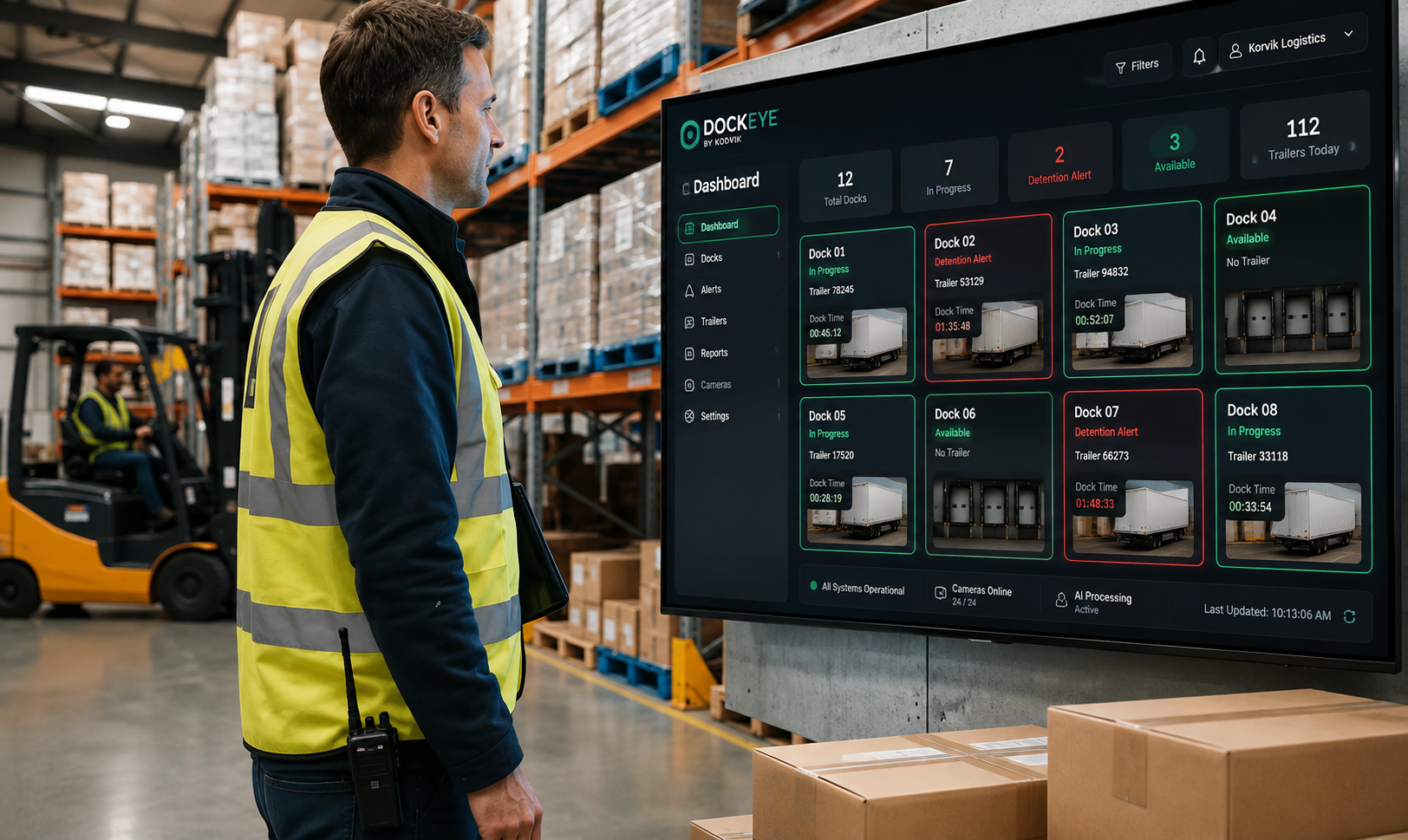
Modern dock management requires real-time, automated monitoring right at the door. Computer vision systems like Korvik Dockeye use AI-equipped cameras mounted at loading docks to continuously monitor bay status.
When a truck backs into a bay, the system automatically detects trailer presence, captures the trailer ID using Optical Character Recognition (OCR), and starts an accurate, digital timestamp. This eliminates manual logging and provides supervisors with a live operational view across all doors.
Configuring Actionable Dwell Alerts
Tracking time is only valuable if supervisors can act before costs accrue. Automated alert systems bridge the gap between detection and intervention.
1. Milestone-Based Warning Thresholds
Instead of discovering an overstay after two hours have passed, supervisors can set configurable alert thresholds. For example, the system can trigger an initial alert at 60 minutes to check loading progress, and an urgent alert at 90 minutes to ensure paperwork and uncoupling are completed before detention begins.
2. Identifying Idle, Empty Trailers
A frequent cause of excess dwell time is the gap between when unloading finishes and when the trailer is removed. Vision systems identify when activity has ceased while the trailer remains docked, alerting floor leads to clear the door for the next scheduled inbound delivery.
3. Role-Specific Dispatch Notifications
Alerts can be routed directly to the personnel who can resolve the issue immediately. Staging alerts notify forklift operators to prioritize a delayed pallet build, while release alerts notify yard hostlers to pull the trailer away from the bay.
Shifting from Dispute Resolution to Prevention
When supervisors rely on lagging reports, managing detention becomes an administrative burden of auditing carrier claims against incomplete logs. Automated time tracking provides indisputable visual and timestamped records of exact door arrival, dwell, and departure times.
More importantly, real-time dwell alerts transform the dock supervisor’s role from reactive claim management to proactive floor control. By resolving bottlenecks as they occur, supervisors protect the bottom line, maintain carrier relationships, and ensure maximum dock door utilization.